CONTENT OF PORTFOLIO
Add a header to begin generating the table of contents
DEVOPS AND CLOUD RELATED PROJECTS
EXECUTED PROJECTS || CONTRIBUTIONS
- GITHUB ACTIONS CICD PIPELINE PROJECT – SOURCE GITHUB
- MICROSERVICE_CHAT_ APPLICATION USING DOCKER AND KUBERNETES
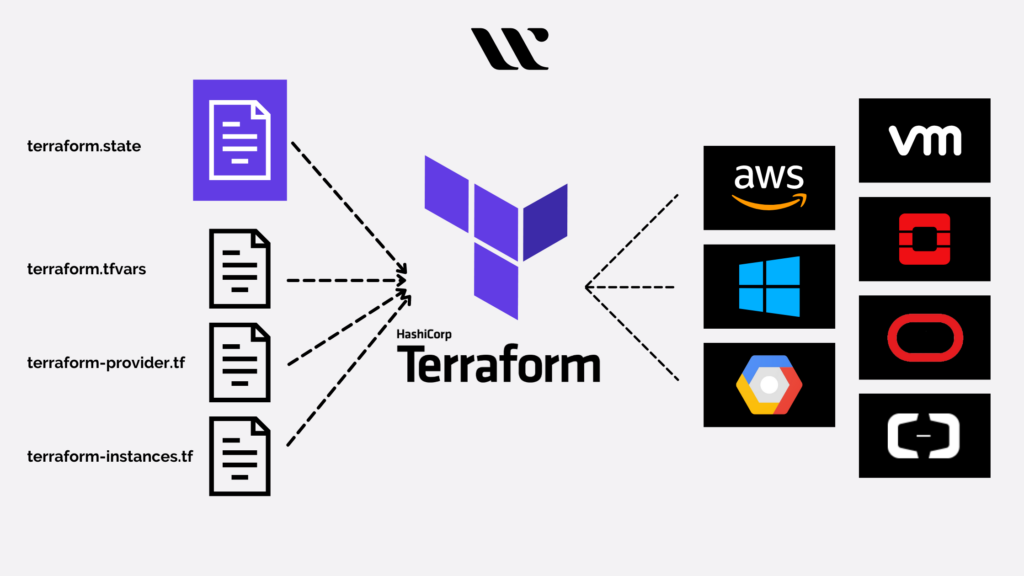
- PROVISIONING DOCKER INFRASTRUCTURE USING TERRAFORM
- PYTHON AUTOMATION PROJECT
- SETTING UP A TERRAFORM MODULE FOR A VIRTUAL PRIVATE CLOUD
- STATIC HOSTING IN AMAZON S3
- BUILDING A VIRTUAL PRIVATE CLOUD
- VPC TRAFFIC FLOW AND SECURITY
GITHUB ACTIONS CICD PIPELINE PROJECT
This is a full DevOps project demonstrating:
Docker containerization
Automated builds & tests using GitHub Actions
Pushing Docker images to Docker Hub
Deployment using Docker Hub images
Unit testing with PyTest
A simple Python/Flask application
Tools&Softwares
Kubernetes
Docker
Pytest unit testing
GitHub Actions CI/CD Pipeline
Automatic build & push to Docker Hub
Deployment using Docker Hub image
MICROSERVICE-CHAT-APPLICATION
Tool requirement for the project
Python 3.11+ installed (for FastAPI services)
Docker & Docker Compose installed
VS Code extensions (optional but helpful):
Python (for code highlighting, virtualenv)
Docker (to manage containers)
Pylance (for type checking)
REST Client (optional, test APIs from VS Code)
Live Share (optional, for collaboration)
Tools&Softwares
Flask (simple Python API)
Docker
Pytest unit testing
GitHub Actions CI/CD Pipeline
Automatic build & push to Docker Hub
Deployment using Docker Hub image
PROVISIONING DOCKER INFRASTRUCTURE USING TERRAFORM
PROJECT DESCRIPTION
Creating and managing Docker infrastructure using Terraform involves defining your desired Docker resources in Terraform configuration files and then using Terraform commands to provision and manage those resources.
Terraform and its related plugins
- Docker images
KEY TAKEAWAYS FROM PROJECT
The above project demonstrated the following
Key understanding of the terraform modules and syntaxes
Understanding the implementations of the verious terraform commands
Re-organization of the various modules to provision an infrstrasture(Docker)
Understanding of versioning in terraform and implementations with plugins in terraform
BACKEND DEVELOPMENT FOR A RESTAURNT BLOG
PROJECT DETAILS
Node.js and Express.js are distinct components within the JavaScript ecosystem for server-side development, serving different purposes but often used together.
• Node.js is a runtime environment that allows JavaScript code to be executed outside of a web browser, typically on a server.why we use mongo db?- MongoDB is a popular choice for many modern applications due to its flexibility, scalability, and high performance. It’s a NoSQL database, offering a schema-less document model that allows for easier handling of diverse and evolving data structures. MongoDB’s horizontal scalability and robust indexing also make it suitable for applications with high traffic and complex data
KEY TAKEAWAYS FROM THE PROJECT
- Installation of project depenedencies using npm
- Installation of router for connection
- Creating models for backend development
- Setting up of a database connection for mongodb
TERRAFORM INSTRUCTURE SETUP FOR VIRTUAL PRIVATE CLOUD
Project Goals
This project serves as a showcase of best practices in Infrastructure as Code (IaC), specifically demonstrating:
Modular and Reusable Code: Using Terraform to define an entire VPC stack, including networking components.
Networking Fundamentals: Establishing a highly available and secure network architecture (e.g., public and private subnets, routing).
Remote State Management: Setting up a remote backend (e.g., S3/DynamoDB, Azure Storage, GCS, or HCP Terraform) for collaborative and secure state storage.
Input Variables: Utilizing variables to make the configuration dynamic and easily deployable in different environments.
Key Takeaways (What I Learned)
Provider Configuration: Learned to configure the [AWS/GCP/Azure] provider and authenticate securely.
Resource Dependency: Handled implicit dependencies, such as ensuring the Route Tables are attached to the Subnets after they are created.
Data Sources: Used data “aws_availability_zones” to dynamically fetch AZs, ensuring the subnets are distributed correctly for high availability.
Resource Loops: Used for_each or count arguments to provision multiple, identical resources (like subnets) efficiently.
CLIENTS AND COLLEAGUE TESTIMONIALS
“He Has a blend of problem solving technique that makes him a game changer”

Karen Daisy
Marketing Director, Taidrones
“Working with TechWizard was a game changer. Their approach to cloud solutions is unmatched!”
LYRIC SANDERS
Software Eng. Lexix Nexis
“Professional, reliable, and innovative. I highly recommend him for any organization who wish to engage.
Emily Adams
CTO, EPIGOS AI